hello@sofrik.com

Step-by-Step Guide to Implementing Accelerated Mobile Pages (AMP)

sofrik
10 March 2025


In today’s fast-paced digital world, website speed and mobile user experience are critical for success. Accelerated Mobile Pages (AMP) is an open-source framework developed by Google that helps accelerate mobile pages and ensure they load faster on mobile devices. Based on our experience implementing Accelerated Mobile Pages for content-driven websites, we’ve seen noticeable improvements in mobile load times and user retention when AMP is properly configured. The framework uses streamlined HTML, controlled JavaScript, and Google’s AMP cache to deliver faster, lightweight pages designed specifically for mobile users.
What Is the Use of AMP?
So, what is accelerated mobile pages technology all about? AMP is designed to optimize mobile browsing by helping web pages load almost instantly on smartphones and tablets.
Based on our experience implementing AMP for content-focused websites, it works especially well where mobile traffic is high and speed directly impacts user engagement.
AMP achieves faster performance through:
1. AMP HTML — a streamlined version of standard HTML
2. Controlled JavaScript libraries that prevent heavy scripts
3. Google AMP Cache — which preloads and serves pages quickly
The primary uses of AMP include:
a. Enhancing Page Speed
AMP for faster mobile pages improves loading time, helping reduce bounce rates and support stronger user retention.
b. Supporting Mobile SEO Performance 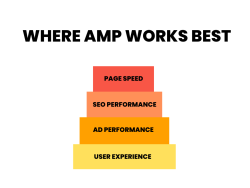
Faster mobile performance and better Core Web Vitals can help improve search visibility and user engagement.
Want to see how AMP improves your page speed in real time? Measure your website performance with PageSpeed Insights and discover actionable optimization tips.
c. Improving Ad Performance
AMP supports lightweight, well-optimized ads that load smoothly, improving viewability and engagement potential.
d. Improving User Experience
Fast-loading pages enhance AMP mobile optimization, making browsing smoother and more user-friendly across devices.
Let’s walk you through how to create an AMP page, the benefits of AMP, and whether it’s the right choice for your website.
How to Create AMP Pages?
Accelerated Mobile Pages implementation on your website involves a few key steps:
1. Create an AMP HTML Version
AMP uses a stripped-down version of HTML called AMP HTML. To create AMP pages, start by building a new version of your webpage with the following structure:
<!DOCTYPE html>
<html ⚡>
<head>
<meta charset=”utf-8″>
<title>AMP Page Example</title>
<link rel=”canonical” href=”https://yourwebsite.com/regular-page.html”>
<script async src=”https://cdn.ampproject.org/v0.js”></script>
<style amp-boilerplate>
body { visibility: hidden; animation: fadeIn 0.5s ease-in; }
</style>
</head>
<body>
<h1>Welcome to AMP</h1>
<p>This is an Accelerated Mobile Page.</p>
</body>
</html>
Your business deserves a better website. Let’s us make it happen. Connect with professional web development Services today!
2. Validate Your AMP Page
Validation ensures your AMP works correctly:
a. Open your AMP page in a browser.
b. Append #development=1 to the URL.

c. Use the browser console to view any issues.
3. Submit to Google Search Console
Submitting your AMP URLs is key to accelerated mobile pages monitoring. Google will crawl and index your AMP content, giving you insights and helping you fix any problems.
4. Implementing Accelerated Mobile Pages on CMS Platforms
If your site is built with WordPress, install the Official AMP Plugin or “AMP for WP” to streamline amp implementation. These plugins help you create AMP pages without touching code.
Should I Use AMP for My Website?
It’s important to evaluate whether it aligns with your website’s goals, technology stack, and user experience requirements. While AMP can significantly improve page loading speed on mobile devices, it may not be the best fit for every website. And following a practical AMP guide can help you understand implementation needs and limitations
When AMP Can Be Beneficial
You may benefit from implementing AMP if:
1. Your audience is primarily mobile users. AMP is designed to deliver faster loading experiences on mobile devices, which can reduce bounce rates and improve engagement.
2. Page speed directly affects conversions. For content-driven sites, blogs, publishers, and news platforms, faster loading pages can improve user satisfaction and lead to better performance in search results.
3. You rely on search visibility for content discovery. AMP has historically been used by publishers to improve performance in mobile search and news platforms.
When AMP May Not Be the Best Choice
AMP might not be suitable if:
1. Your website depends heavily on custom JavaScript functionality. AMP restricts certain scripts to maintain speed and performance.
2. Your design requires extensive customization. AMP uses a simplified framework that may limit advanced design flexibility.
3. Your monetization strategy relies on unsupported third-party scripts or complex ad integrations.
In many cases, modern performance optimization techniques such as Core Web Vitals optimization, image compression, caching, and lightweight frameworks can deliver similar speed improvements without implementing AMP.
Our Website Development Services can help you build a fast, mobile-friendly, and SEO-optimized website. Get started today!
What Are the Benefits of AMP?
If you are exploring Accelerated Mobile Pages (AMP), understanding its potential benefits can help you decide whether it fits your website’s performance and SEO goals.
1. Faster Page Loading on Mobile
AMP pages are built using a streamlined HTML framework and restricted JavaScript, which helps pages load quickly on mobile devices. Faster load times can improve user experience, particularly for content-heavy sites such as blogs, news portals, and publishers.
2. Improved Mobile User Experience
Because AMP prioritizes performance and simplified layouts, it can deliver smoother browsing on slower networks and mobile devices. This often results in better usability for readers accessing content on smartphones.
3. Higher Engagement Potential
When pages load quickly, users are less likely to abandon the site. Faster performance can contribute to improved engagement metrics such as time on page, scroll depth, and session duration.
4. Better Ad Performance for Publishers
AMP supports several advertising networks and optimized ad formats. For websites that rely on advertising revenue, faster-loading pages may improve ad viewability and user interaction with ads.
5. Improved Performance in Mobile Search Experiences
Although AMP itself is not a direct Google ranking factor, faster pages often contribute to better Core Web Vitals performance, which can support improved search visibility and user satisfaction.
Take a look at our detailed take on Pytorch VS Tensorflow.
How to Setup AMP Effectively?
If you decide to implement AMP, following best practices can help you maintain performance and usability.
1. Optimize Images and Media
Use properly compressed images, responsive image formats, and minimal CSS to keep page sizes small and loading times fast.
2. Monitor AMP Performance
Use Google Search Console and performance monitoring tools to track AMP errors, indexing status, and user engagement metrics.
3. Ensure Ad and Analytics Compatibility
If your website relies on advertising or analytics tracking, confirm that the scripts and networks you use are supported within the AMP framework.
4. Test Across Devices
Regularly test AMP pages across different mobile devices, browsers, and network speeds to ensure consistent performance and usability.
Need help beyond AMP? Our mobile and web development teams can guide you from Mobile App Development Services to full-stack performance improvements.
Conclusion
Accelerated Mobile Pages (AMP) can be a useful framework for websites that prioritize mobile performance, fast content delivery, and simplified page structures. It is particularly beneficial for publishers, blogs, and content-heavy websites with a large mobile audience.
However, AMP is not necessary for every site. Modern optimization techniques—such as improving Core Web Vitals, image optimization, caching, and lightweight front-end frameworks—can also deliver excellent performance without AMP.
Before implementing AMP, evaluate your website’s technical requirements, mobile traffic patterns, and user experience goals to determine whether it is the right solution for your platform.
How to fix an AMP issue?
Validate the page with the AMP Validator (browser extension, URL param, or Search Console), review flagged errors, correct invalid markup/components, then re‑test and re‑submit.
Will AMP work for e-commerce websites?
Yes. Product, category, and content pages can use AMP components; just ensure cart/checkout flows are supported (often via canonical or hybrid approaches).
How long does it take to implement AMP on a website?
Using plugins (e.g., WordPress) can take hours; custom, design‑matched builds with templates, tracking, and QA may take days to a few weeks depending on site complexity.
Common mistakes to avoid when implementing AMP?
Missing canonical links, invalid AMP markup, stripped tracking, design breakage, and not maintaining parity between AMP and non‑AMP content (schema, ads, conversion paths).