hello@sofrik.com

React Native Expo vs CLI: Which Should You Choose for Your Mobile App in 2026?


sofrik
24 June 2026


You’ve decided to build a mobile app with React Native — and then someone in the room asks: “Should we use React Native Expo vs CLI?”
It sounds like a developer question. It isn’t — or at least, not entirely. The React Native Expo vs CLI decision shapes how quickly your app reaches users, how much your development team costs, how dependent you are on third-party services, and how easy (or painful) it is to scale two years from now. Get it wrong early, and you’re rebuilding from scratch at exactly the wrong moment.
“This article is for two groups of people: business owners and product leaders who need to make — or approve — this mobile app development technology decision, & junior developers who are setting up a React Native project and want to understand what they’re committing to.“
By the end, both groups will have a clear, honest framework to make the right call for their specific situation. No hype, no filler.
What Is React Native? A Quick Primer
React Native is an open-source framework developed by Meta (formerly Facebook) that lets developers write mobile apps in JavaScript — and have those apps run natively on both iOS and Android. Unlike a website wrapped in a browser shell, React Native apps compile to actual native components, which means they look and feel like real mobile apps rather than dressed-up web pages.
The business appeal of React Native for mobile app development is significant: instead of maintaining two entirely separate codebases — one in Swift for iOS and one in Kotlin for Android — a single React Native team can ship to both platforms simultaneously. That cuts development costs, simplifies hiring, and accelerates iteration. It is the technology behind apps at companies including Microsoft, Shopify, and Meta itself.
React Native is today the most widely adopted framework for cross-platform mobile app development and is the go-to choice for teams entering app development without wanting to maintain two separate native codebases. Understanding how to set it up correctly — which is exactly what the React Native Expo vs CLI question is about — is one of the most important early decisions in any app development project.
For the full technical picture, read the official React Native documentation.
What Is Expo?
Think of Expo as a fully fitted kitchen versus an empty room with plumbing. React Native gives you the plumbing. Expo gives you the worktops, the appliances, and a professional chef standing by to help.
“Expo is an open-source platform and set of tools built on top of React Native. It abstracts away a significant amount of the complex configuration that React Native normally requires — native build tooling, Xcode and Android Studio setup, provisioning profiles, signing certificates — and replaces it with managed services and sensible defaults. You write your app logic; Expo handles a great deal of the infrastructure around it.“
There are two key modes:
1. Managed Workflow — Expo manages your native builds entirely. You write JavaScript/TypeScript only. This is the fastest path from idea to running cross-platform mobile app, but it means you work within Expo’s supported API surface. The Expo managed workflow is the recommended starting point for the majority of new development projects in 2026.
2. Bare Workflow — You get the Expo SDK and tooling, but you also have direct access to the underlying native code. More control, but more responsibility.
Alongside the framework itself, Expo offers Expo Go (a client app that lets you preview your app on a real device instantly, without building) and EAS — Expo Application Services (cloud-based build, submission, and update infrastructure).
What Is React Native CLI?
React Native CLI is the official, unmanaged way to initialize and run a React Native project. Where Expo wraps React Native in a managed layer, the CLI gives you direct access to the raw framework — sometimes referred to as “bare metal” development.
When you set up a project with the React Native CLI, you are working directly inside native iOS and Android project directories. You configure Xcode yourself. You manage your Android Gradle files. You install native libraries by linking them to the platform-specific code. Nothing is abstracted; everything is yours to control.
For a developer, this means complete freedom — any native module, any SDK, any platform API is available to you without waiting for Expo to support it. For a business owner, React Native CLI means your team takes full ownership of the build environment and all its complexity, which has real implications for cost, hiring, and velocity.
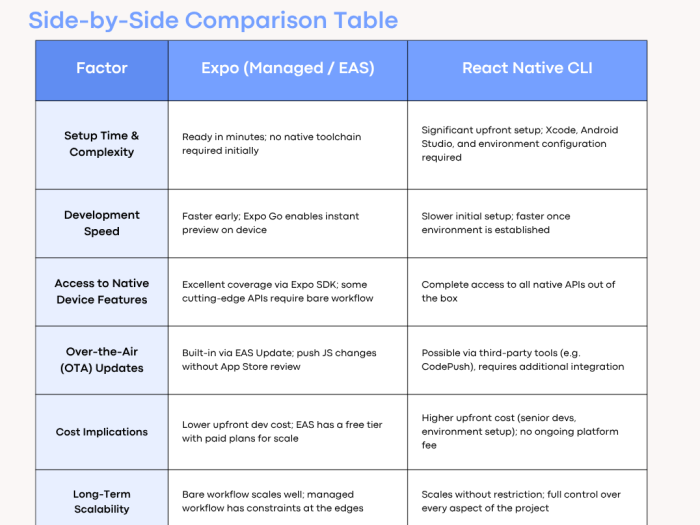
Quick Takeaways
✅ Choose Expo if you:
- Need to launch your app quickly.
- Prefer a simpler development workflow.
- Want built-in OTA updates.
- Are building an MVP or startup product.
- Have a limited development budget.
✅ Choose React Native CLI if you:
- Need complete native customization.
- Plan to build complex enterprise applications.
- Require unrestricted access to native APIs.
- Expect long-term scalability and flexibility.
- Have an experienced React Native team.
Bottom Line
“Expo is the better choice for faster development and lower initial costs, while React Native CLI is ideal for projects requiring maximum customization, performance, and scalability.”
Deep Dive: When to Choose Expo
“Choose Expo if your project looks like this…“
1. You’re building an MVP or early prototype
Speed matters most when you’re validating an idea. The Expo managed workflow lets a small mobile app development team go from zero to a working cross-platform mobile app on a real device in hours rather than days. Expo is engineered precisely for this scenario — and for most early-stage projects, it is the correct default choice in any React Native Expo vs CLI evaluation.
2. You’re a startup or scale-up with a small team
If your team is lean — one or two React Native developers, perhaps also handling the backend — you don’t want them spending their time debugging Gradle configurations or wrestling with Xcode signing certificates. The Expo managed workflow abstracts those complexities, so your team stays focused on product logic. The engineering overhead of CLI can quietly consume a disproportionate amount of a small team’s capacity.
3. You’re a non-technical founder or a business owner leading the project
Expo is significantly easier to hand to a new developer and get running. If your team has turnover, onboarding a replacement developer onto an Expo project is far simpler than inheriting a heavily customized CLI project. It also reduces vendor lock-in to individual senior developers who “know how the build works” — a real and underappreciated business risk.
4. You’re building a content-driven, data-driven, or SaaS companion app
Apps that primarily display content, handle user authentication, render lists and dashboards, push notifications, and access the camera or location — these are solidly within Expo’s sweet spot. The vast majority of commercial app ideas fall into this category. Expo’s SDK covers cameras, sensors, maps, biometrics, notifications, payments (via Stripe), and much more.
“Will Expo limit me later?“
This is the most common concern, and it deserves an honest answer: in the managed workflow, yes — you are constrained to APIs that Expo explicitly supports. However, the Expo SDK is broad and continuously updated. For most projects, you will never hit those limits. And if you do, the bare workflow or a migration to CLI are real options, not dead ends. Many successful apps running in production were built with Expo and never needed to leave it.
From a business standpoint: faster time to market, lower upfront development cost, easier developer hiring, simpler onboarding, and no need for macOS infrastructure to build iOS apps (EAS handles this in the cloud). For the right project, these advantages are substantial.
Deep Dive: When to Choose React Native CLI
“Choose CLI if your project looks like this…“
1. You have complex hardware or platform integrations
If your app needs to communicate with Bluetooth hardware, interact with proprietary payment terminals, integrate a biometric SDK from a financial institution, or manage background processes at a deep system level, you need direct access to native code. CLI gives you this without negotiation. Some of these integrations either don’t exist in Expo’s managed SDK or are simply not possible without writing native Objective-C, Swift, Kotlin, or Java — and CLI is the natural home for that work. React Native CLI gives you this without negotiation — and no managed framework can match it for these requirements.
2. You’re building an enterprise-grade application
Large enterprise apps often have requirements that are incompatible with a managed third-party layer: air-gapped build environments, specific security libraries, MDM (Mobile Device Management) integrations, deep OS customization, or compliance requirements that dictate where your build infrastructure lives. React Native CLI’s full ownership model is the appropriate choice here. You control every dependency, every configuration, and every build artefact.
3. You have an existing native codebase
If your business already has an iOS or Android app written in Swift, Kotlin, or Objective-C — and you want to add React Native to it incrementally rather than rebuild from scratch — this is the “brownfield” approach, and CLI is the only viable path. Expo’s managed workflow cannot be embedded into an existing native project.
4. Your app requires performance-critical native extensions
High-performance video processing, real-time AR features, complex audio manipulation, or custom rendering pipelines occasionally require native code that goes well beyond what any managed abstraction layer provides. If your app’s core value proposition lives in this territory, CLI is the right starting point.
“Is CLI overkill for my project?“
For the majority of commercial app projects — probably 70–80% — yes, it is. The total cost of ownership is higher: you need more experienced developers, you take on more infrastructure responsibility, and your build process is more complex from day one. The honest advice is to resist defaulting to CLI because it “feels more professional.” Use it when you genuinely need what it offers, not as a precaution.
The business implication is direct: CLI projects typically cost more to build and maintain. They require senior React Native developers with native experience. They take longer to reach a first working build. These are justified costs when the project demands them — and unnecessary costs when it doesn’t.
The Hybrid Path: Expo Bare Workflow
There is a middle ground that many teams don’t fully explore: the Expo Bare Workflow.
In the bare workflow, you eject from Expo’s fully managed environment but retain access to the Expo SDK and EAS tooling. Your project contains the actual native iOS and Android directories — you can modify them directly, add any native module, and write custom native code — while still benefiting from Expo’s libraries, over-the-air updates, and EAS Build infrastructure.
This path makes particular sense when a project starts in Expo’s managed workflow, grows, and eventually needs a native module that isn’t available in the managed SDK. Rather than migrating entirely to CLI and losing all Expo’s tooling, teams can eject to the bare workflow and retain what’s valuable while gaining what was missing.
It is also a sensible starting point for projects that anticipate needing native customization but want to move quickly in the early stages.
Questions to Ask Before You Decide
Before you choose Expo or CLI, work through this self-assessment. Your answers will point clearly in one direction.
1. How quickly do you need a working prototype or MVP? If the answer is “in weeks, not months,” Expo is almost certainly the right starting point.
2. Does your app require integrations with third-party hardware or proprietary S

DKs? Bluetooth, NFC, custom payment terminals, MDM systems — if yes, lean toward CLI.
3. What is the experience level of your development team? If you’re hiring mid-level JavaScript developers rather than senior React Native specialists, Expo’s managed workflow significantly reduces the risk of environment-related delays and errors.
4. Do you have access to macOS infrastructure for iOS builds? If not — or if you prefer not to manage this — EAS Build removes the requirement entirely.
5. Is this app an addition to an existing native codebase? If yes, CLI is the only viable path. Expo managed workflow cannot be embedded into a pre-existing native project.
6. What is your tolerance for third-party dependency on Expo as a platform? Expo is well-funded, widely adopted, and backed by a strong team — but it is a dependency. If your organization has strict policies about infrastructure ownership, CLI gives you complete autonomy.
7. Do you anticipate needing Over-the-Air updates — pushing fixes without App Store approval? If yes, Expo’s EAS Update (or the bare workflow equivalent) provides this out of the box; CLI requires additional tooling.
8. What is the projected long-term scale and complexity of this app? A simple companion app for a physical product is different from an enterprise platform that will evolve for ten years. Consider where you’ll be in three years, not just where you are today.
Sofrik’s Recommendation
After working with both Expo and React Native CLI across projects ranging from rapid MVPs to enterprise-grade platforms, Sofrik view is straightforward: start with Expo unless you have a specific, identified reason not to.
For most business owners approaching a new mobile app project, the speed, cost efficiency, and reduced infrastructure burden of Expo — particularly with EAS Build — deliver real commercial value. The concern that “Expo will limit us later” is legitimate in theory but rarely materializes in practice for well-scoped projects. And when it does, the migration path to bare workflow exists and is well-documented.
CLI is the right choice when the project genuinely demands it: complex native integrations, enterprise infrastructure requirements, or an existing native codebase. Choosing CLI as a default because it feels “more serious” adds cost and complexity without corresponding benefit.
There is no universal right answer — and any technology partner who tells you otherwise without understanding your project isn’t giving you honest advice. If you’d like to talk through your specific situation, we’re happy to help. Get in touch with the Sofrik team for a free discovery conversation.
Conclusion
The React Native Expo vs CLI decision is ultimately a question of control versus speed, and where your project sits on that spectrum. Expo offers an accelerated path to production with less infrastructure overhead, and is the right starting point for the majority of commercial mobile app projects in 2026. CLI offers complete control with no dependency on a third-party ecosystem and is the right choice when your project’s requirements demand it.
The framework above — your timeline, your team, your integration requirements, your build infrastructure — gives you everything you need to make this decision confidently. When in doubt, start with Expo, build something real, and graduate to the bare workflow or CLI if and when the project genuinely outgrows it. That path is well-trodden and much less risky than it sounds.
Ready to move forward? Talk to the Sofrik team about your mobile project.
Can I switch from Expo to React Native CLI later?
Yes, though the process requires effort. Expo provides an "eject" or "prebuild" mechanism that generates the native iOS and Android project directories, effectively converting your project into a bare workflow or CLI-compatible structure. The Expo SDK libraries remain usable after ejection. The process is well-documented and manageable for experienced developers, but it is not entirely seamless — plan for a development sprint to handle the migration cleanly.
Which is better for a startup: Expo or CLI?
For the vast majority of startups, Expo is the better starting point. Startups typically need to move fast, iterate frequently, keep initial development costs low, and minimise the infrastructure burden on a small team. Expo's managed workflow and EAS Build are specifically well-suited to this context. The exception is a startup whose core product requires deep native integrations from day one — in that case, the overhead of CLI is justified by the product requirements. When in doubt, start with Expo and migrate only if you hit a ceiling.
Can Expo apps be submitted to both the App Store and Google Play?
Yes. Expo apps — both managed and bare workflow — can be submitted to Apple's App Store and the Google Play Store. EAS Build produces the correct binary format for each platform (.ipa for iOS, .aab or .apk for Android), and EAS Submit automates the submission process to both stores. For a detailed step-by-step checklist covering both platforms, see our guide on How to submit an app to the App Store and Google Play.
This article was written by the technical team at Sofrik Services Private Limited. Sofrik is a software development agency based in India, delivering web and mobile applications, AI/ML solutions, CRM/ERP platforms, and related services for clients across industries.
For a free consultation on your mobile development project, Contact us here.